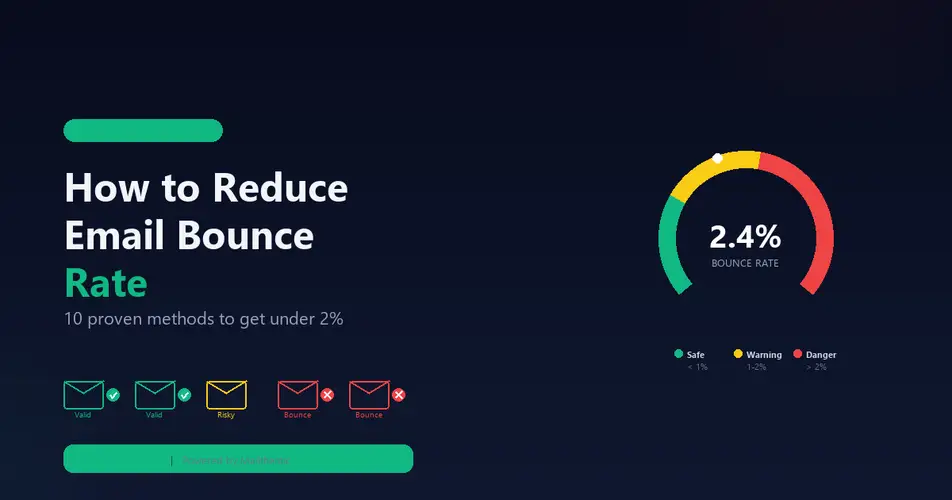

Every email marketer dreads the bounce notification. You spend hours crafting the perfect campaign, segmenting your list, and writing compelling copy — only to watch your bounce rate climb and your sender reputation tank. If your email bounce rate exceeds 2%, you are already in the danger zone.
In this comprehensive guide, we will break down what email bounce rate actually means, why it matters more than most marketers realize, and the exact steps you can take to bring it under control — permanently.
What Is Email Bounce Rate?
Email bounce rate is the percentage of emails in a campaign that were not delivered to the recipient’s inbox. When an email bounces, the receiving mail server rejects the message and sends back an error code to the sender.
The formula is straightforward:
Bounce Rate = (Number of Bounced Emails ÷ Total Emails Sent) × 100
For example, if you send 10,000 emails and 350 bounce, your bounce rate is 3.5%. That might sound small, but it is enough to trigger spam filters and get your domain blacklisted by major email service providers like Gmail, Outlook, and Yahoo.
Hard Bounce vs Soft Bounce: The Critical Difference
Not all bounces are created equal. Understanding the difference between hard and soft bounces is essential for diagnosing and fixing deliverability issues.
Hard Bounces
A hard bounce is a permanent delivery failure. The email address simply does not exist, the domain is invalid, or the mail server has explicitly rejected the message. Common causes include:
- Invalid email addresses — Typos like “gmial.com” instead of “gmail.com”
- Nonexistent mailboxes — The user deleted their account or never existed
- Dead domains — The company shut down or changed its domain
- Blocked by the server — The receiving server permanently rejects your IP or domain
Hard bounces should be removed from your list immediately. Every hard bounce you continue to send to actively damages your sender reputation.
Soft Bounces
A soft bounce is a temporary delivery failure. The email address exists and is valid, but the message could not be delivered at that moment. Common causes include:
- Full mailbox — The recipient’s inbox has reached its storage limit
- Server downtime — The receiving server is temporarily unavailable
- Message too large — The email exceeds the server’s size limits
- Rate limiting — You are sending too many emails too quickly
Soft bounces deserve monitoring. If the same address soft bounces three or more times across different campaigns, treat it as a hard bounce and remove it.
Why Your Bounce Rate Is Destroying Your Campaigns
A high bounce rate does not just mean a few emails did not land. It creates a cascading failure that affects every aspect of your email marketing:
1. Sender Reputation Damage
Email service providers (ESPs) like Gmail, Microsoft, and Yahoo assign a reputation score to every sending domain and IP address. When your bounce rate is high, these providers interpret it as a signal that you are sending to unverified or purchased lists — a hallmark of spammers.
Once your sender reputation drops below a certain threshold, even your legitimate emails to real subscribers start landing in the spam folder. Rebuilding a damaged sender reputation can take weeks or even months.
2. ESP Account Suspension
Marketing platforms like Mailchimp, SendGrid, and HubSpot monitor bounce rates closely. If your bounce rate consistently exceeds their thresholds (typically 2-5%), they may throttle your sending, flag your account for review, or suspend it entirely.
3. Wasted Marketing Budget
Most ESPs charge based on the number of emails sent or the size of your contact list. Every bounced email is money thrown away. If 5% of your 100,000-email list is invalid, that is 5,000 wasted sends per campaign — potentially hundreds of dollars per month for zero return.
4. Skewed Analytics
High bounce rates distort every downstream metric. Your open rate, click-through rate, and conversion rate are all calculated against total emails sent. When a significant portion of those emails never arrived, your actual engagement numbers are misleading.
What Is a Good Email Bounce Rate?
Industry benchmarks vary, but here is a general framework:
| Bounce Rate | Rating | Action Required |
|---|---|---|
| Under 1% | Excellent | Maintain current practices |
| 1% - 2% | Acceptable | Monitor and clean quarterly |
| 2% - 5% | Concerning | Immediate list cleaning needed |
| Over 5% | Critical | Stop sending and clean your entire list |
The target should always be below 2%. Anything above that puts your sender reputation at risk and reduces the effectiveness of every campaign you send.
10 Proven Methods to Reduce Email Bounce Rate
1. Verify Your Email List Before Sending
This is the single most impactful action you can take. An email verification service checks every address on your list against multiple validation layers — syntax checks, DNS validation, SMTP mailbox confirmation, and disposable email detection.
Tools like Mailthentic run a 9-point verification check on each email address, including SMTP-level mailbox confirmation, catch-all detection, and role account identification. This catches invalid addresses before they ever hit your ESP and generate a bounce.
For large lists, bulk email verification can process thousands of addresses in minutes and export segmented results — giving you a clean “safe to send” list and a separate file of risky or invalid addresses to remove.
2. Implement Double Opt-In
Double opt-in requires new subscribers to confirm their email address by clicking a link in a confirmation email before being added to your list. This eliminates:
- Typos and misspelled addresses
- Fake signups from bots
- Disposable email addresses (users rarely check them for confirmation)
- Unwilling subscribers who did not intend to sign up
While double opt-in may reduce your total subscriber count by 10-20%, the subscribers who remain are genuinely interested and verified — resulting in higher engagement and virtually zero bounces.
3. Add Real-Time Email Verification at Signup
Instead of waiting until you send a campaign to discover invalid addresses, verify emails the moment they are entered. Real-time API verification checks the address instantly and can reject invalid entries before they pollute your list.
Mailthentic’s email verification API processes single email checks in seconds, making it ideal for integration into signup forms, checkout flows, and lead capture pages. A simple API call returns the verification status, confidence score, and whether the address is disposable or a role account.
4. Clean Your List Regularly
Email lists decay at a rate of approximately 22-30% per year. People change jobs, abandon email accounts, and companies shut down. A list that was 100% clean six months ago could have thousands of invalid addresses today.
Set a quarterly schedule for bulk list verification. Upload your entire contact list, remove addresses flagged as invalid, and quarantine risky addresses (catch-all domains, role accounts) for separate treatment.
5. Remove Role-Based Email Addresses
Role-based addresses like info@, admin@, support@, and sales@ are shared inboxes managed by teams rather than individuals. They tend to have lower engagement rates and higher complaint rates. Some organizations also configure them to reject external marketing emails.
Advanced email verification tools detect role accounts automatically by checking against databases of 150+ known role-based prefixes. Remove or segment these addresses to improve overall list quality.
6. Block Disposable Email Addresses
Disposable email services like Guerrilla Mail, Temp Mail, and Mailinator provide temporary addresses that self-destruct after a short period. Users who sign up with disposable addresses have zero intent to engage with your content long-term.
Blocking disposable emails at the point of entry prevents them from ever reaching your list. Email verification APIs maintain databases of 800+ known disposable email providers and can flag them instantly during signup.
7. Monitor Your Sender Reputation
Your sender reputation is the invisible force that determines whether your emails reach the inbox or the spam folder. Monitor it using:
- Google Postmaster Tools — Shows your domain reputation with Gmail
- Microsoft SNDS — Smart Network Data Services for Outlook/Hotmail reputation
- MXToolbox — Checks if your IP is on any blacklists
If you notice reputation declining, immediately audit your list for invalid addresses and reduce your sending volume until the reputation recovers.
8. Authenticate Your Email Domain
Proper email authentication tells receiving servers that you are a legitimate sender. Three records are essential:
- SPF (Sender Policy Framework) — Specifies which servers are authorized to send email on behalf of your domain
- DKIM (DomainKeys Identified Mail) — Adds a cryptographic signature to verify the email was not altered in transit
- DMARC (Domain-based Message Authentication) — Tells receivers what to do with emails that fail SPF or DKIM checks
Without these records, your emails are more likely to be flagged as suspicious, increasing the chance of both soft bounces and spam folder placement.
9. Segment and Send Gradually
Sending to your entire list at once can trigger rate limiting and temporary bounces, especially if you are using a new IP or domain. Instead:
- Segment your list by engagement level (most active first)
- Warm up new IPs gradually (start with 500 emails/day and scale up)
- Spread large campaigns across multiple days
- Prioritize recently active subscribers
10. Track Bounces and Build a Feedback Loop
Every bounce provides valuable data. Track bounce codes and categorize them:
- 550 — User unknown (hard bounce, remove immediately)
- 552 — Mailbox full (soft bounce, retry later)
- 421 — Too many connections (rate limit, slow down)
- 554 — Transaction failed (check your reputation)
Some advanced email verification platforms offer bounce feedback reporting — you feed your actual campaign bounce data back into the system, and it uses that information to improve verification accuracy for future jobs. This creates a self-improving feedback loop that makes your list cleaner with every send.
The ROI of Email List Cleaning
Let us do the math on what a clean email list is actually worth:
Assume you have a 50,000-email list with a 5% invalid rate (2,500 bad addresses). You send 4 campaigns per month at $0.001 per email:
- Wasted send cost: 2,500 × 4 × $0.001 = $10/month ($120/year)
- Lost deliverability impact: If your bounce rate causes even a 10% drop in inbox placement for the remaining 47,500 valid addresses, that is 4,750 emails per campaign landing in spam instead of the inbox
- Revenue impact: At a 2% conversion rate and $50 average order, those 4,750 missed inboxes represent $4,750 in lost revenue per campaign — or $19,000 per month
The cost of email verification? Typically $5-50 for 50,000 addresses. The return on investment is not close.
How to Choose an Email Verification Service
Not all email verification services are equal. When evaluating options, look for:
- Multi-layer verification — Syntax, DNS, SMTP, and reputation checks combined
- Catch-all detection — Identifies domains that accept all emails (making individual address verification unreliable)
- Disposable email detection — Flags temporary email addresses
- Confidence scoring — Not just pass/fail, but a nuanced score that helps you make risk-based decisions
- API access — For real-time verification in your signup flows
- CRM integrations — Direct connections to HubSpot, Salesforce, and Mailchimp
- Data security — GDPR compliance, encryption, and no email sending during verification
Mailthentic checks all of these boxes with a transparent confidence scoring system (0-100 per email), campaign readiness tiers (Safe to Send, Likely Safe, Use with Caution, Do Not Send), and native CRM integrations. You can start with 100 free verification credits to test the accuracy before committing to a paid plan.
Quick-Start Checklist
- Run your current email list through a bulk email verification service
- Remove all addresses flagged as invalid
- Segment risky addresses (catch-all, role accounts) into a separate list
- Implement double opt-in for all new subscribers
- Add real-time email verification to your signup forms
- Set up SPF, DKIM, and DMARC authentication for your sending domain
- Schedule quarterly list cleaning
- Monitor bounce rates and sender reputation after every campaign
Final Thoughts
Email bounce rate is not just a vanity metric — it is the foundation of your email deliverability. A high bounce rate undermines every aspect of your email marketing, from sender reputation to campaign ROI. The good news is that it is entirely preventable with the right combination of list hygiene practices and verification tools.
Start by cleaning your existing list, then build prevention into your workflow so invalid addresses never make it onto your list in the first place. Your future open rates, click-through rates, and revenue will thank you.

Comments (0)
No comments yet. Be the first to share your thoughts!
Leave a Comment
Your email address will not be published. Required fields are marked *